

Expense Receipt Management
Turn receipt photos into instant reimbursement-no typing, no delays, no lost paperwork
Book a DemoKey Benefits
50+ Minutes Back Every Day
Eliminate the manual receipt data entry grind-take a photo, AI extracts the data, you're done in 10 seconds instead of 5 minutes per receipt
Zero Lost Receipts, Zero Missing Reimbursements
Digital archive of every receipt with automatic metadata-never again lose a receipt to a jacket pocket or car floor
Faster Money in Your Account
Instant expense submission with automatic categorisation means your reimbursement moves through approval faster-cash flow matters when you're working gig economy
Perfect Accuracy, No Typos
Machine learning extracts vendor names, amounts, and dates more accurately than manual typing-eliminates the "I misread the amount" errors that delay reimbursement
Works With Every Receipt Format
Crumpled receipts, faded ink, foreign languages, multiple currencies-the system handles what humans struggle with, so nothing gets lost to "I can't read this"
Automatic Smart Categorisation
The system suggests the right expense category based on vendor name-you're not manually sorting into parking, fuel, tolls, meals-it figures it out instantly
Multi-Currency Handling
Working cross-border? Automatic currency detection and real-time conversion mean your international expenses are reimbursed correctly without confusion
Complete Audit Proof
Every receipt photo stored with location metadata, timestamp, category, and extracted data-perfect for tax time, audits, or company reimbursement disputes
How It Works
Incur Expense
You purchase fuel, park your vehicle, pay a toll, or incur any business expense during your shift.
Capture Receipt
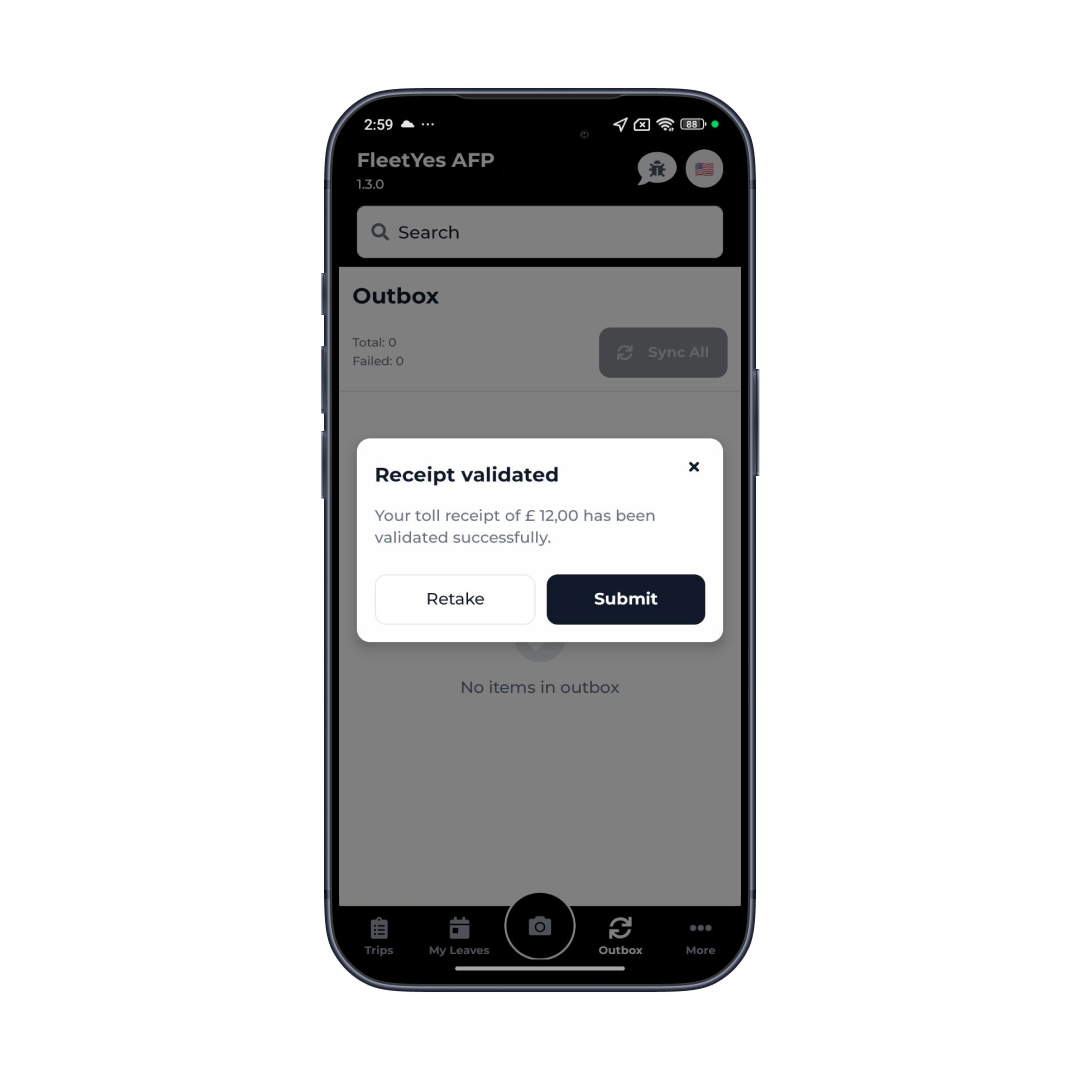
Open the expense section and photograph the receipt. The camera automatically detects the receipt in the frame and captures it with location metadata.
AI Extracts Details
Machine learning instantly extracts vendor name, amount, and date from the receipt photo. You review and confirm the data-or edit if needed.
Categorise & Submit
Select the expense category (the system may suggest one automatically). Add any notes, then submit for approval and reimbursement.
Core Capabilities
In-app receipt photography with automatic detection
ML-powered OCR text extraction from receipt images
Automatic vendor, amount, and date parsing
Intelligent expense categorisation (parking, fuel, tolls, etc.)
Manual expense entry option for cash transactions
Location tagging with GPS metadata
Expense history with search and filtering
Submission and approval workflow tracking
Expense Receipt Management
50+ Minutes Back Every Day: Eliminate the manual receipt data entry grind-take a photo, AI extracts the data, you're done in 10 seconds instead of 5 minutes per receipt
Real-World Use Cases
Fuel Cost Management
Drivers log fuel purchases instantly with receipt photos for fleet fuel analysis and cost tracking
Parking Expense Tracking
Urban delivery drivers document parking costs automatically with location data verification
Toll & Highway Charges
Interstate drivers capture toll receipts instantly with system categorisation
Client Reimbursement
Direct client expenses tracked separately for accurate billing and cost allocation
Receipts Pile Up. Reimbursements Don't. That's the Problem.
Expense reporting is where good intentions meet reality. You intend to submit expenses immediately. Reality: receipts pile up, you lose half of them, data entry takes forever, reimbursement takes weeks. Meanwhile, you're out-of-pocket for business expenses.
Our system kills every pain point. You photograph the receipt the moment you get it-no risk of losing it. The system extracts the data automatically-no manual typing. Everything's categorized instantly-no guessing or second-guessing. You submit, it goes through approval faster because the data is perfect, and your reimbursement arrives sooner.
For your company: They get immediate visibility into driver expenses by category and location instead of waiting for monthly reports. Expense processing is faster because the data arrives clean and categorized. And they have perfect records for audits, tax time, or investigations. Everyone wins when expense processing is automated.
Integration & Compatibility
ML Kit Text Recognition
On-device OCR for receipt detection and privacy
Image Processing
Photo capture, optimisation, and storage services
EXIF Data
Automatic location and timestamp capture from photos
Payment Systems
Integration with reimbursement processing and accounting
Currency API
Real-time exchange rate data for currency conversion
Receipt Database
Backend storage and retrieval for archived receipts
Stop Manual Expense Tracking and Speed Up Reimbursements
Photograph receipts. AI reads everything automatically. Finance closes faster. Drivers get paid on time.
Book a Demo